K2 Blog

K2 is the popular, powerful and awarded content extension for Joomla! with CCK-like features developed by JoomlaWorks, makers of fine Joomla! extensions since 2006. It provides an out-of-the box integrated solution featuring rich content forms for items (think of Joomla! articles with additional fields for article images, videos, image galleries and attachments), nested-level categories, tags, comments, a system to extend the item base form with additional fields, a powerful plugin API to extend item, category and user forms, ACL, frontend editing, sub-templates and a lot more!
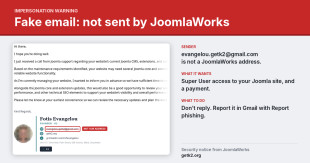
  1. Security notice: emails impersonating the K2 developer

    Emails sent from evangelou.getk2@gmail.com do not come from JoomlaWorks or from Fotis Evangelou, the developer of K2. JoomlaWorks does not own or control this address.

    Since 14 October 2026, Joomla site owners have been receiving unsolicited emails that use Fotis Evangelou's name, a link to getk2.org and his public LinkedIn profile, together with a photograph of a different person. Several clients of JoomlaWorks and members of the Joomla community have forwarded these messages to us.

    Their purpose is to obtain administrator access to the recipient's website and a payment for services that will not be delivered.

    If you have received one of these emails, do not reply and do not create any user account.

    This notice describes the messages, explains how to verify genuine correspondence from JoomlaWorks, and sets out the steps to take if you have already responded.

    Description of the messages

    The initial message carries the subject line "Important: Joomla Website Updates and Technical SEO Optimization Before October 25".

    The message states that:

    • "Joomla support" contacted the sender by telephone regarding the recipient's Joomla installation, extensions and configuration.

    • The website requires core and extension updates before 25 October.

    • The sender is "currently managing" the recipient's website.

    • A review of the website's SEO configuration and technical optimisation should be carried out at the same time.

    The signature includes Fotis Evangelou's name, the title "Founder · K2", links to getk2.org and to his LinkedIn profile, a postal address and a profile photograph. The photograph does not depict Fotis Evangelou.

    None of these statements are accurate. Joomla is a volunteer-run open source project. It has no support service that contacts developers about third-party websites, and there is no Joomla deadline on 25 October. Replies to the address trigger an automatic response that repeats the original message, followed later by a personal reply from the sender.

    Objectives of the scam

    The full exchange with the sender has been documented, with screenshots and message headers, by Phil Taylor of mySites.guru: Be Aware Of Joomla Developer Impersonation Scams. It shows that the sender pursues two objectives:

    1. Administrator access. The recipient is asked to create a Joomla Super User account named "Fotis Evangelou" with the address evangelou.getk2@gmail.com, on the pretext of restoring lost access. A Super User account grants full control of a website, including the ability to install extensions, execute code, read the database and create further administrator accounts.

    2. Payment. The recipient is offered maintenance plans priced between $350 and $550 and then receives an invoice through a third-party invoicing platform. The invoice is issued under a different name, and the sender asks the recipient not to use the platform's escrow option, which would withhold payment until the work is confirmed.

    The messages pass SPF, DKIM and DMARC authentication. These checks confirm only that the messages were sent from that Gmail account. They do not establish who registered the account, and any person can register a Gmail address containing a well-known name.

    Verifying correspondence from JoomlaWorks

    • JoomlaWorks and Fotis Evangelou correspond with clients and collaborators only from @joomlaworks.net & @getk2.org. We do not use Gmail or other free email services for this purpose.

    • We do not send unsolicited messages claiming to have been contacted by "Joomla support" about a website.

    • We do not request the creation of Super User or administrator accounts by email, and we do not ask for login credentials to be sent by email.

    • We do not issue invoices through third-party invoicing platforms or under the name of another person.

    If you are uncertain whether a message is genuine, do not use any address, telephone number or link it contains. Contact us through a channel you used before the message arrived, or through the contact page on this website.

    Recommended action for recipients

    1. Do not reply. A reply confirms that your address is active and initiates further contact.

    2. Report the message to Google. In Gmail, open the message and select Report phishing. Reports can also be submitted through Google's Gmail abuse form. Multiple reports concerning the same account carry more weight.

    3. Delete the message and inform any colleagues who may have received it.

    If you have already created an account or made a payment

    1. Block or delete the account in Users: Manage, then change the passwords of all Super User accounts.

    2. Review the user list for any other Super User or administrator accounts you do not recognise.

    3. Review System: Manage: Extensions for recently installed extensions you did not install, and check the User Actions Log for activity by the new account.

    4. If the account was used, treat the website as compromised. Restore a known clean backup or have the website audited before returning it to service.

    5. If you made a payment, contact your bank or card provider and the invoicing platform immediately and report the transaction as fraudulent.

    Reports filed

    • JoomlaWorks has reported the Gmail account to Google as an impersonation, with the full message headers.

    • The Joomla Security Strike Team has confirmed the impersonation and has also reported the account to Google.

    • The fraudulent invoice has been reported to the invoicing platform and its payment processor.

    This notice will be updated if further information becomes available.

    Other developers affected

    According to the mySites.guru report, similar messages are being sent under the names of other well-known members of the Joomla community. We recommend treating any unexpected request for website access or payment with the same caution, regardless of the sender's name, and verifying it through a channel you already trust.

    We thank the clients and community members who reported these messages. Please share this notice with anyone who manages a Joomla website.

  2. K2 v2.11, rolling releases, Joomla 4 and more

    K2 v2.11 is now available to download for Joomla versions 1.5 to 3.x. This release adds new features, improves existing features, resolves various bugs and adds PHP 8 compatibility.

    If you're also wondering what's up with Joomla 4, read on...

    First things first...

    To install K2 for the first time or update your existing K2 based website, just grab the latest package here: https://getk2.org/downloads/?f=K2_Rolling_Release.zip

    The process to update K2 is fairly simple. If you are on Joomla 1.5, grab the zip file from the link above and install it on top of your existing K2 version. If you are on Joomla 2.5 or 3.x, go to the Joomla update manager, purge the update cache, re-check and you'll see the new release available to update instantly.


    So what's new with this release?

    Here's a list of the most notable additions, changes or updates in K2 v2.11, organized by main topic:

    NEW FEATURES

    • New "Selected Tags" feature in the K2 Tools. This allows you to create a hot/trending style tags menu for the frontend. For a real-world example, have a look at the "Trending" section on this site.
    • New meta tags for Twitter sharing and tag/user listings.
    • Added "Not specified" option in user gender option.

    IMPROVEMENTS & BUG FIXES

    GENERAL

    • Full PHP 8 support. Keep in mind that outdated HTML template overrides may still cause minor issues if you switch your site to PHP 8. These are usually very easy to fix by comparing your overrides and the lines that produce errors with the default overrides in K2.
    • Massive code cleanups, under-the-hood changes & fixes of various PHP notices and warnings.

    URL ROUTING

    • Further performance improvements in K2 URL routing.
    • Automatically use the K2 menu item with the highest ID pointing to all K2 categories as fallback (root) menu item for tags, users etc. This way you'll never end up for example with "/component/k2/" prefixed URLs for tags & users.

    MODULES

    • K2 Content: Fixed the "today" popularity filter in J3.x.
    • K2 Tools: Added field togglers in J3.x. This will make navigating to the actual option used much easier when editing that module.
    • K2 Tools: Improve PHP code rendeing when using it through the "custom code" option (no temp files used anymore).
    • Set hidden XML option "cachemode" to "static" by default on all K2 modules, which improves cache performance in J3.x.
    • Remove pre-specified cache time (in seconds) in all K2 modules.

    FRONTEND

    • Added option to use a WYSIWYG or plain text editor in the profile register/edit pages.
    • Extend the "robots" meta tag with "max-image-preview:large", which is utilized by Google Discover to display large image previews by default.
    • Added option in the K2 Settings (component) to control Twitter sharing card layout: either use a small image with text on the right OR a large image with text at the bottom
    • Improved the meta tags "description" & "keywords" used in tag & user (author blog) views. Indexed tag/user pages by Google will now produce better preview titles in Google search results.
    • Enrich available data for previous/next item navigation. You can now create for example image based previous/next blocks with title & introtext below your K2 item content, instead of plain text links. See the code comments in the item.php override for more.
    • Item navigation will now honor either default category ordering (by item ID) or explicit (custom) ordering (as set in each K2 category). Ordering by other factors (e.g. date, alphabetical etc.) will be added at a later update.
    • Added reCaptcha/Mootools JS patch for Joomla 1.5 & 2.5.

    TAGS

    • Better handling for deleted or non-existing tags by redirect to the site's homepage. The same applies to a tag's feed or json output and helps reduce indexing issues with search engines like Google or Bing.
    • Pass raw tag name to the tag.php template (to be used with $this->name) - handy if you want to create custom headings or meta data

    FEEDS

    • In itemlist feeds (categories, tags etc.), use the "modified date" when ordering results by "latest modified" in the relevant backend settings.
    • Fix typo in itemlist feeds' generated HTML inside the "description" tag and also convert multi-line "description" to single-line (helps with validation).
    • Properly handle double quotes in image alt attributes for all generated feeds.
    • New feature: Generated feed URLs can now be manipulated with the use of 2 query parameters (tagsontitle & taglimit) to allow rendering actual K2 item tags in each feed item's title. E.g. the URL https://www.example.com/allnews?format=feed&tagsontitle=1&taglimit=2 will enable this feature (tagsontitle=1) and include the first 2 item tags (taglimit=2) on each feed item's title. This can come extremely handy when you want to enrich your K2 feeds output, especially when using K2 feeds for auto-posting content in social media (e.g. Twitter or Facebook). For example, a tweet generated by the feed content would include these tags on its text, e.g. "K2 is awesome for social media posting #awesome #joomla" (followed by an image preview & link of course).

    SEARCH

    • Improved frontend search result display and added more content fields as "searchable" by default (e.g. the image caption field).
    • Disable searching for words smaller than 3 characters (default MySQL/MariaDB limit) - filter the visible search phrase.
    • Properly enforce the correct search URL route when using the relevant option in the K2 Tools' "Search" settings.

    BACKEND

    • Bring back the ID indicator in the item & category edit forms (first tab).
    • Align drop-down lists to the left inside the batch processing modal.
    • Show a disabled "Settings" menu when editing content in the backend (otherwise it just looks weird for admins editing content)
    • Optimize file uploading in the K2 item form & allow all safe file types to be uploaded as an attachment. Also extended MIME type support to allow uploading newer file formats as attachments.

    DATABASE

    • Enforce specific index use for frontend itemlists when sorting items by dates (query optimizer hints).
    • Add missing table indices on existing K2 installations upon upgrading K2. This will improve database performance for existing K2 installations.
    • Rewrote some SQL queries for full MySQL 8 compatibility.
    • Mark frontend & backend itemlist queries with SQL comments. This will come extremely handy when using a terminal/CLI query monitoring app like mytop or innotop to distinguish between heavy frontend (=bot crawling) or backend operations. E.g. in mytop you'll now see the queries marked like /* Backend / K2 / Items */ SELECT SQL_CALC_FOUND_ROWS... or /* Frontend / K2 / Items */ SELECT SQL_CALC_FOUND_ROWS....

    MEDIA

    • Added URL query timestamp for user avatars in the frontend - this will allow for proper cache busting when using a CDN like CloudFlare (or others) to serve images.
    • Fix AllVideos rendering in the frontend for browsed media.
    • Image caption & credits are now properly deleted when you delete a K2 item image.
    • Fixed issue where pasted media embeds could not be removed from the K2 item form.
    • When using the IAKI plugin for K2, ensure that the generated K2 image paths for Google Structured Data are absolute and not relative.
    • MIME types for image galleries uploaded as zip archives have been corrected to match the extraction capabilities of the Joomla API (and its settings under the Media component).

    CACHING

    • Improve client-side caching for K2 item pages with the proper use of "Last-Modified" and "ETag" HTTP headers for Joomla 1.5 and up to 3.x, even when server-side caching is enabled in Joomla (and you know, Joomla does its thing and does not produce the relevant HTTP headers, because... don't ask...).

    INSTALLER/UPDATER

    • Fixed default K2 user groups not being configured upon first time installation on Joomla 2.5 & 3.x.

    IMPORTER

    • Prevent duplicate tag importing (in Joomla 3.x). Meta tags and actual tags (from com_tags) are properly filtered as unique K2 tags.

    THIRD-PARTY INTEGRATIONS

    • Allow YOOtheme Pro integration (code contributed by Zoolanders - thanks guys!). More info here.
    • Removed reCAPTCHA v1 support (along with one PHP library dependency).
    • Added option to configure theme selection for reCAPTCHA v2 in K2 Settings (component).
    • K2 Media Manager: Updated elFinder to v2.1.61 - this will re-instate file uploads thorugh the K2 Media Manager on sites hosted on Plesk-based servers, as previous releases of elFinder where blocked by Plesk to address general vulnerabilities in elFinder (despite existing safety checks in K2 which further protect elFinder). Plesk would simply cut off elFinder loading simply by checking its version.
    • Replaced jQueryCDN with cdnjs by CloudFlare.

    Upgrading

    If you use v2.7.x to v2.9.x already, then it is (as always) safe to upgrade to K2 v2.11. If you use a version before 2.7.0, refer to the 2.7.0 upgrade notes.

    If you already have your own K2 CSS and/or HTML template overrides then there's nothing to worry about. If you use "stock" K2 CSS and HTML template overrides, just browse your site after the upgrade to make sure nothing's misalligned. In any case, exceptions may occur but they are usually easy to resolve. If you need any help, just post about your issue in the K2 Community Forum.

    Since the release of K2 v2.7.0 we have added an update notification for new releases of K2 within the K2 backend (viewed only by super admins) to make it easier to spot new releases and update accordingly.

    Before upgrading, it's always a good idea to get a backup of your site (just in case):

    • To upgrade in Joomla 1.5, just install v2.10.0 on top of any existing K2 installation.
    • To upgrade in Joomla 2.5 or 3.x, either install on top (as with Joomla 1.5) or use Joomla's extension updater (you should already see the notification for v2.10.0).

    DO NOT uninstall any older K2 version first, as this will wipe out your K2 content!


    HTML & CSS Template Overrides

    As always, have a look here for potential updates to overrides in K2: https://getk2.org/documentation/tutorials/77-k2-template-override-package-comparison


    K2 is now a rolling release

    We are switching K2 to a rolling release development model.

    And no "we don't use Arch BTW"...

    What the hell is a rolling release development model you ask? It means more frequent *official* updates for K2. Like days apart, compared to *cough* years apart, despite K2 actually being constantly updated, cause you know... we actually use K2 on day-to-day large projects which in turn pay for the bills to keep supporting K2 for the last ~14 years...

    Why the change you ask? Because we're bad at writing lengthy blog posts like this, preparing releases and the usual yada-yada. It's a tedious process to be honest for a project like K2. Instead, the rolling release option will allow us to ship changes much faster without interrupting the usual update process for end-users.

    There will still be point releases, e.g. "K2 v2.11", but these will constantly be updated and marked by a build ID (which is a fancy way to timestamp software), whenever code changes are committed to the project. Point releases are practical in the sense that they can be used as a reference so you know if a given K2 release series is compatible with a given Joomla or PHP version in the future.

    Since we're switching to the rolling release development model, K2 download buttons are now automatically marked with the last code commit date.

    So if you're going the rolling release way, how will you document changes you ask? We'll use human-readable & easily accesible GitHub commits as our changelog in the future, so you know exactly what changes with every release. The update process will not change for you, the end-user of K2.

    Of course whenever there is a large release change (e.g. the upcoming v4 to support Joomla 4), we'll let you know with a distinct announcement. As you know we always strive for backwards compatiblity (unlike *cough* Joomla), so if there are any breaking changes, we'll make sure you always know.

    (v3 is jinxed by the way...)

    Which bring us to the next point...


    K2, Joomla 4 & beyond...

    A release for Joomla 4 is long overdue, we know...

    But this boils down to 2 main reasons:

    1. Joomla loves backwards compatibility the same way vampires love the sun. For some unknown reason, the Joomla dev team always strives for the shiny/new, nevermind if this shiny/new is something users never see or experience (=constant Joomla API renamings & changes). I'm guessing that's the main reason Joomla 4 updated its backend UI. If it was the usual API changes, Joomla users would flock en masse to other CMSs that respect backwards compatibility, fearing history would repeat itself, as when Joomla 1.6 was released (over Joomla 1.5, which were 2 totally different CMSs). As such K2 needs to be adapted for unnecessary code renamings. But that's the least work...
    2. Joomla 4 has a new backend UI. Yes. And pub polls indicate it's not really loved for practical reasons. It may seem fresher (or WordPress-ier?) but it's a UI thay requires more clicks to do the same tasks you did in Joomla 3. The settings are also messy. The menus are ugh... It's difficult to work with on smaller resolutions (e.g. 1440px width screens). The list goes on... But when did actual users matter for Joomla for the past decade or so? And to make matters worse, the updated Joomla 4 UI basically requires a total UI rework for any decent sized backend component like K2.

    And these 2 points are probably known to the Joomla dev team, as indicated by their plans for Joomla 5 to openly focus on backwards compatibility (b/c) for the first time. Of course Joomla 5's codename ("Panta Rhei", which freely translates to "everything flows") is not really inspiring on the b/c front, but let's be optimistic.

    Given the above, K2 for Joomla 4 will be released as v4 and will most likely only support Joomla 4.

    We'll keep the 2.x series for Joomla 1.5 - 3.x and update as long as possible to allow you for an easy upgrade path to Joomla 4 (or 5) when you decide to do that. K2's database rarely changes either way, so worse-case scenario you'll just install K2 v4 on Joomla 4+, copy over the K2 database tables from your J1.5-3.x site, move the media files and you're ready.

    New features will only be added to K2 v4 and we will gradually move away from the Joomla API to a more modern implementation, which will be Joomla-backwards-compatiblity-breaking-proofTM.

    For now, enjoy K2 v2.11.

    It's production-ready and powering some of the highest traffic Joomla sites in the world. And this is not a pub poll ;)


    * Some have said that if a nuclear war ever happened, K2 v2 and cockroaches would be the only things to survive the apocalypse.


  3. K2 v2.10.3 now available

    K2 v2.10.3 is now available to download for Joomla versions 1.5 to 3.x. This is a maintenance & bugfix release, which refines the backend user interface (building upon the changes that were introduced with v2.10.0 to v2.10.2), improves client-size (frontend) caching & resolves broken auto-generated feeds URLs.

    We urge everyone using K2 v2.7.0+ to upgrade to this new release.

    To install K2 for the first time or update your existing K2 based website, just grab the latest package here: https://getk2.org/downloads/?f=K2_v2.10.3.zip

    The process to update K2 is fairly simple. If you are on Joomla 1.5, grab the zip file from the link above and install it on top of your existing K2 version. If you are on Joomla 2.5 or 3.x, go to the Joomla update manager, purge the update cache, re-check and you'll see the new release available to update instantly.


    So what's been added, changed or updated in this new release?

    Here's a list of the most notable additions, changes or updates in K2 v2.10.3.

    • Finalized the backend UI (building upon the changes that were introduced with v2.10.0 to v2.10.2). From minor alignment issues (e.g. in tag controls or extra field renderings in the item edit form) to having the same UI controls in all component views, modules and menus, across all supported Joomla versions.
    • Any file upload control will now properly trigger the right media action when using K2 in a smartphone or tablet. That means you can now use your smartphone's camera to snap a picture and upload it directly to a K2 item. Or a video and upload it to the "Media" tab. The change that is planned for K2 v2.11.0 (the next update) is to change the current tab layout in the K2 item edit form to a linear form and also offer an optional lightweight and mobile/touch-friendly WYSIWYG editor to replace any Joomla (desktop oriented) WYSIWYG editor when editing content through a smartphone or tablet.
    • Extra fields: Added new "select extra field group" default option when creating a new extra field (previously the first group was preselected), the "required" option is now set to "no" by default, improved CSV uploading & previewing/rendering, updated the layout for extra fields in the K2 item edit form (emphasized headers, extended spacing for lists/checkboxes to cover for lengthy text options, textareas & WYSIWYG blocks that cover all available horizontal space & are now better to manage content and more).
    • Fixed JCE top tabs misalignment which was caused by generic CSS styling.
    • A link to the K2 Settings is now available in both the sidebar and button toolbar.
    • Introduced new option "Set a request limit for all item listings..." in the "Advanced" section of the "Administrator" tab. To protect your site from serving unintended large requests for K2 item listings (via HTML, Atom/RSS feeds and the JSON API) when the 'limit' URL variable is manually modified, this option allows you to configure a hardcoded limit and prevent your database from potential downtime and thus your site. If you set this option to 0 then no limit is enforced. This option was previously hardcoded in the itemlist views to 100 items.
    • Improved client-side caching with the addition of 2 new HTTP headers ("Last-Modified" & "Etag") that allow K2 to better control client-side caching to browsers and server-side caching to proxies like Varnish, Haproxy, Nginx etc. Unlike Joomla content, when caching is only enabled in Joomla's Global Configuration options, K2 will properly respond with adjusted Cache-Control/Expires headers plus the 2 new HTTP headers added. In the end, your Joomla/K2 site will simply be served more efficiently to your visitors.
    • To complement the HTTP header changes, K2 now ensures that it will always send the correct Content-Type HTTP header for JSON and JSONP requests, even when caching is enabled in Joomla. The way Joomla handles HTTP headers when caching is enabled is really a long-standing big WTF. TLDR; when caching is enabled in Joomla, components cannot send HTTP headers corrently because Joomla only caches the HTML body that is output by each component view & not HTTP headers. K2 works around this Joomla limitation by passing a custom type script tag in the <head> of the HTML page that defines any custom HTTP headers required by its content & finally the K2 system plugin parses this specialized script tag and sends the additional HTTP headers passed by K2 content.
    • Fixed auto-generated feed URLs (broken in v2.10.2). Feeds will now be generated as relative URLs only.
    • The canonical URL option can now be entirely disabled.
    • Properly set the canonical URL for paginated itemlist views. If an item is crawled by a search engine in "Page 2" of your category listing, then K2 will use that specific page's URL for the canonical URL <head> link.
    • Fixed canonical URLs for tag/user views when Joomla is served from a domain subdirectory.
    • K2 Content (module): added new "today" option for the popularity filter. This option is handy especially for media sites that only wish to display the day's most popular K2 items (based on hits).
    • Fixed the "title" for attachments.
    • Link-type extra fields now provide the raw URL as part of their output (either as $this->item->rawValue or $item->rawValue, depending on where they are rendered).
    • Removed hardcoded restrictions in the K2 item model (frontend) for the user object. In other words, user details (like the name, avatar etc.) will be usable anywhere in K2 content.
    • Improved the K2 URL router's performance. Additional URL manipulation options and performance improvements are planned for K2 v2.11.0.
    • Improved compatibility with Falang and resolved the dreaded "pagination missing" issue.
    • Translated tag pages with either JoomFish or Falang will now be properly rendered by K2.
    • Improved compatibility with PHP 7.4.
    • Resolved fatal error when using PHP 5.3 (as reported in https://github.com/getk2/k2/issues/506) to comply with Joomla 3.x's minimum requirements (https://downloads.joomla.org/technical-requirements).


    A word on translation packages for K2

    It recently came to our attention that some K2 language packs still use the infamous "_QQ_" identifier, which dates back to the days of Joomla 1.6! This identifier was used to render double quotes in language packs but it now causes broken translations for K2 in recent versions of Joomla, as it is no longer supported by Joomla.

    As such, in order to resolve this issue once and for all, we now pre-process all language packs and remove that indentifier, ensuring it is replaced by a single quote.

    This results in usable language packs for the affected languages (e.g. French, Danish and many others).


    Upgrading

    If you use v2.7.x to v2.9.x already, then it is (as always) safe to upgrade to K2 v2.10.3. If you use a version before 2.7.0, refer to the 2.7.0 upgrade notes.

    If you already have your own K2 CSS and/or HTML template overrides then there's nothing to worry about. If you use "stock" K2 CSS and HTML template overrides, just browse your site after the upgrade to make sure nothing's misalligned. In any case, exceptions may occur but they are usually easy to resolve. If you need any help, just post about your issue in the K2 Community Forum.

    Since the release of K2 v2.7.0 we have added an update notification for new releases of K2 within the K2 backend (viewed only by super admins) to make it easier to spot new releases and update accordingly.

    Before upgrading, it's always a good idea to get a backup of your site (just in case):

    • To upgrade in Joomla 1.5, just install v2.10.0 on top of any existing K2 installation.
    • To upgrade in Joomla 2.5 or 3.x, either install on top (as with Joomla 1.5) or use Joomla's extension updater (you should already see the notification for v2.10.0).

    We also highly recommend that you update AllVideos to version 5.x (the most recent).

    DO NOT uninstall any older K2 version first, as this will wipe out your K2 content!


    HTML & CSS Template Overrides

    Have a look here: https://getk2.org/documentation/tutorials/77-k2-template-override-package-comparison

    There are minor changes in the tag.php and generic.php sub-templates due to the addition of page headings and the search bar (in generic.php).


    What's next

    The next update (v2.11.0) will finalize the new K2 URL router (more URL manipulation options & better performance) and introduce a new (optional) mobile & touch friendly editor for content editing via smartphones and tablets, which will make content editing easier compared to traditional WYSIWYG editors in Joomla.

    There is already a list of other minor improvements for K2 v2.11.0 which will further refine the 2.x series, but no other significant changes will be introduced. These are pushed for K2 v4 (you read that correctly, there won't be a v3) which will be 100% backwards compatible with K2 v2 and as such the upgrade process will be seamsless (as always). K2 v4 will be Joomla 4 compatible & it will introduce major updates to frontend component views & modules, a new modular extra fields system with new extra field types, attachment re-ordering, integration with Joomla's user action logging & privacy features & more.

    For now, enjoy K2 v2.10.3!

  4. K2 v2.10.2 released - now with a 100% mobile-friendly backend user interface!

    K2 v2.10.2 is now available to download for Joomla versions 1.5 to 3.x. This is a maintenance & security release: it concludes the backend user interface changes that were introduced with v2.10.0 and is now 100% mobile-friendly and it also addresses a (low severity) vulnerability that was discovered in a third-party library used.

    We urge everyone using K2 v2.7.0+ to upgrade to this new release.

    To install K2 for the first time or update your existing K2 based website, just grab the latest package here: https://getk2.org/downloads/?f=K2_v2.10.2.zip

    The process to update K2 is fairly simple. If you are on Joomla 1.5, grab the zip file from the link above and install it on top of your existing K2 version. If you are on Joomla 2.5 or 3.x, go to the Joomla update manager, purge the update cache, re-check and you'll see the new release available to instantly update.

    So what's been added, changed or updated in this new release?

    Here's a list of the important things added, changed or updated in K2 v2.10.2.

    • Fully re-worked backend user interface (UI) that is now 100% mobile-friendly. We'd like to think it's the best looking -and more importantly the most practical to use in a mobile device- Joomla component. The new UI has been carefully crafted and tested on multiple devices, on all K2 views, including menus and modules, for a true mobile app-like feel. If you manage content on the go, then you'll love using K2 on smartphones and/or tablets.
    • Fully revamped the "batch operations" modal in the backend UI.
    • Flatpickr has been reverted to the latest version in the 4.5.x series (v4.5.7). This resolves a bug which made deleting a calendar date impossible. Once the developers of Flatpickr resolve this issue, K2 will adopt the new version in the next update.
    • Resolved a bug where K2 items with no images would display with an empty <img /> tag in the K2 content module and on custom K2 template overrides (with relaxed image object checks).
    • Addressed a (low severity) vulnerability that was discovered in the third-party PHP library "class.upload.php" that K2 uses for file uploads. Under certain server setups (e.g. fresh Ubuntu 18.04 installation with Apache, PHP and MySQL installed from core repos) an attacker could upload certain file types as images, bypassing the library's security checks. Keep in mind that depending on your server's MIME configuration, you may not be affected at all by this vulnerability (e.g. cPanel-based  or Plesk-based servers are not affected). A sincere thank you to Jinny Ramsmark (of Defensify AB) for discovering the vulnerability and for letting us know in advance. You can read the related reports for CVE-2019–19576 and CVE-2019–19634 in Jinny's blog.
    • Re-instated the "edit Joomla user" toolbar button in the K2 edit user form which was previously hidden in Joomla 3.x only.
    • Fixed various backend UI bugs that were introduced in v2.10.1, e.g. the filters in the K2 modal selector are no longer getting cut-off by the modal header.
    • System messages will now hide after 3 seconds (instead of 5 in v2.10.1).
    • New flat-style K2 favicon used in Joomla 1.5 & 2.5.

    Upgrading

    If you use v2.7.x to v2.9.x already, then it is (as always) safe to upgrade to K2 v2.10.1. If you use a version before 2.7.0, refer to the 2.7.0 upgrade notes.

    If you already have your own K2 CSS and/or HTML template overrides then there's nothing to worry about. If you use "stock" K2 CSS and HTML template overrides, just browse your site after the upgrade to make sure nothing's misalligned. In any case, exceptions may occur but they are usually easy to resolve. If you need any help, just post about your issue in the K2 Community Forum.

    Since the release of K2 v2.7.0 we have added an update notification for new releases of K2 within the K2 backend (viewed only by super admins) to make it easier to spot new releases and update accordingly.

    Before upgrading, it's always a good idea to get a backup of your site (just in case):

    • To upgrade in Joomla 1.5, just install v2.10.0 on top of any existing K2 installation.
    • To upgrade in Joomla 2.5 or 3.x, either install on top (as with Joomla 1.5) or use Joomla's extension updater (you should already see the notification for v2.10.0).

    We also highly recommend that you update AllVideos to version 5.x (the most recent).

    DO NOT uninstall any older K2 version first, as this will wipe out your K2 content!

    HTML & CSS Template Overrides

    Have a look here: https://getk2.org/documentation/tutorials/77-k2-template-override-package-comparison

    There are minor changes in the tag.php and generic.php sub-templates due to the addition of page headings and the search bar (in generic.php).

    What's next

    The next major update (v2.11.0 - around Jan/Feb 2020) will introduce a more modernized (& responsive out-of-the-box) frontend, hopefully with zero dependencies to any 3rd party JS library. This basically translates to improvements for all frontend views to share a common structure, which will make creating your own set of K2 template overrides an even easier task, especially if your category, tag, user etc. views share the same design and features.

    These changes will also be coupled with some content changes (e.g. the removal of the item toolbar in the item view). As always, ful backwards compatibility will allow for safe upgrades to the newer release.

    Enjoy K2 v2.10.2!

  5. Retiring the K2 templates section

    As we're preparing to launch a new website for getk2.org, we have decided to make an important change in the K2 Extensions Directory (KED).

    We stopped accepting new entries for templates in the KED about 2 weeks ago and this week we unpublished all template entries. So the KED now consists only of extensions that support or interface with K2, plus the translations which are automatically created from K2's project on Transifex.

    The new getk2.org will have a special section to list all Joomla template providers that support K2. So if you wish to get listed there, just send us a message through this site's contact form. To the template providers who decide not to get listed in this new section of our site, we thank you for having supported K2 so far.

    Beyond these changes, we've started a new curated showcase section which replaces any old (and some outdated) listings. The plan is to list websites that really make a great case for the K2 showcase, not just any Joomla site built with K2 (there are hundreds of thousands either way). Priority will be given to sites from well-known brands (local or international) and sites that are exceptionally designed & developed (even if they are just small corporate site presentations).

    If you've built (or know) a K2 site that matches these simple requirements, let us know - either on social media or using this site's contact form.